Ready? AEM, Shoot!
- Nov 29, 2024
- 9 min read
Updated: Apr 20, 2025
A little background
Adobe Experience Manager is widely adopted by businesses that need a robust solution for managing digital assets, websites, and marketing campaigns. It's an enterprise-level CMS, meaning it can handle the heavy lifting of large-scale content distribution, personalization, and user experience optimization. But with great power comes great...security concerns.
At its core, AEM operates on Java and integrates with many other Adobe products like Analytics and Target. This connectivity is what makes AEM a powerful platform, but it's also what turns it into a giant target for threat actors. A CMS that connects so many critical business processes is always under the microscope for potential vulnerabilities. And AEM has had its share of those.

Credit: Frans Rosén
The ongoing challenge of vulnerabilities in AEM
AEM vulnerabilities can often stem from improper input validation, insecure configurations, or weak access control mechanisms. For instance, cross-site scripting, server-side request forgery and remote code execution vulnerabilities have been some of the more concerning issues for AEM over the years. These vulnerabilities can give attackers a foothold to execute malicious code, steal sensitive data, or gain unauthorized access to an organization's environment.
The frequent introduction of custom workflows, third-party integrations, and extensions increases the complexity of AEM environments, making it difficult to manage and secure against ever-evolving threats.
The Anatomy of an AEM Vulnerability
AEM vulnerabilities typically originate from one of three areas:
Poorly secured default configurations – Leaving certain permissions wide open because the out-of-the-box setup seems fine until it isn’t.
Java-based exploits – AEM’s underlying architecture relies heavily on Java, and where Java goes, security concerns follow. Old libraries, insufficient sandboxing, and even logic flaws can lead to serious trouble.
Third-party integrations – AEM loves to play with other software. Integrations are great until they’re not. Each new plugin, extension, or custom components you introduce adds another potential weak point.
For example, you might start off with a well-configured AEM instance, but once you start adding in a bunch of custom workflows, third-party connectors, and custom components, you’re basically playing Jenga. One wrong move (or unpatched vulnerability), and the whole thing could come tumbling down.
Finding AEM Instances in the Wild
If you're looking to track down AEM instances in the wild, the trick is knowing where to look, and using a few simple techniques can help you spot AEM-powered sites quickly. Let me walk you through the process.
Google Dorking
One of the easiest ways to start is by leveraging a couple of Google dorks. By searching for specific directories or files that are unique to AEM, you can uncover publicly accessible instances. Here are a few google dorks that you can use. You could either mix these up, use only one of them, or all together, go wild.
"inurl:/content/usergenerated"
"inurl:/content/dam"
"inurl:/jcr:content"
"inurl:/libs/granite"
"inurl:/etc/clientlibs"
"inurl:/content/geometrixx"
"inurl:/bin/wcm"
"inurl:/crx/de"
"inurl:/content/usergenerated | inurl:/content/dam | inurl:/jcr:content | inurl:/libs/granite | inurl:/etc/clientlibs | inurl:/content/geometrixx | inurl:/bin/wcm | inurl:/crx/de site:example[.]com"
Using these will give you results for AEM-related directories, like /content/dam/ where digital assets are stored or /etc.clientlibs for client-side resources. If you find any of the aforementioned, you’re most likely looking at a site running AEM.
Reviewing HTML for AEM Directories
Another easy way to confirm if a site is using AEM is by digging into the HTML source of the webpage. Open up the main page, right-click, and view the source. What you're looking for are references to paths like /etc/designs, /etc.clientlibs/, /content/, or /dam/. If you spot those in the HTML, it’s a dead giveaway that AEM is powering the site.
You’d be surprised—sometimes even big, well-known websites leave these directories exposed, which could potentially lead to vulnerabilities.


Once you’ve got some potential targets from your search, a good next step is to check if they have a bug bounty program or at least a vulnerability disclosure policy through platforms like HackerOne, or BugCrowd or any other Bug Bounties platforms. That way, you’re operating within a legal framework and possibly ( ) even getting paid for your efforts.
Down the rabbit hole
Now that you've bagged your AEM targets, it's time to dig deeper and see what valuable information you can uncover. At this stage, you're moving from simple reconnaissance to more detailed exploration of the environment and down the rabbit hole.
Personally, I like using AEM Hacker, which is a python-based toolset written by Mikhail Egorov that had previously done a really great research on AEM (I highly recommend checking both of his presentations):
The "aem_hacker.py" script that can be found in the toolset is designed to identify some of the most common AEM vulnerabilities and bypasses, as well as uncover exposed directories that could be leveraged for further exploitation. Essentially, it automates the initial scanning process, making it easier to quickly gather information on potential weak points. However, I view this tool as just the starting line. It’s excellent for getting a quick overview, but it only scratches the surface. After using it for initial discovery, I switch to manual analysis to dig deeper and find the juicier stuff.
Using it is pretty straight forward:
python3 aem_hacker.py -u <target> --host <your_vps_ip>once it successfully discovers any potential weak points, the output looks something like this:
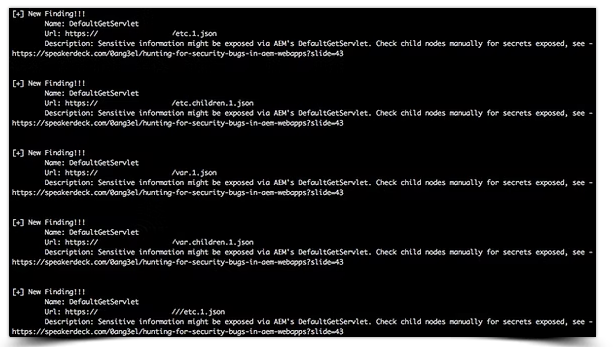
In addition to that, you could also use Nuclei's AEM template to scan targets at scale, and finally, you can continue going down the rabbit hole by fuzzing more in depth using any fuzzing tool of your liking, there are plenty of custom AEM related wordlists on Github, you can try those out or create your own one.
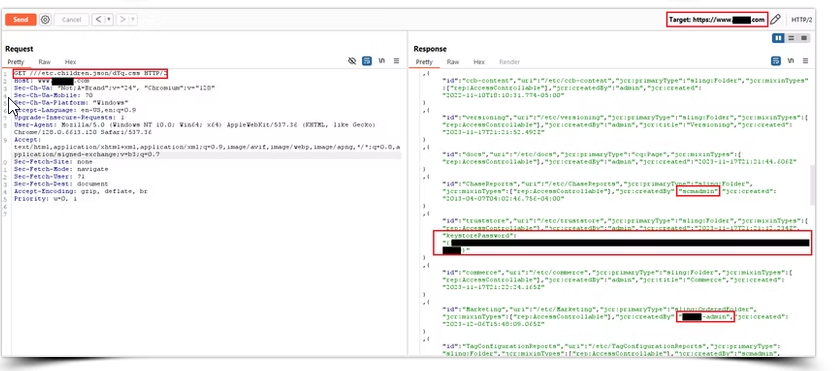
Now let’s say you’ve got a target, and you’re able to start viewing directories and files by appending something like .json, ;.html, or %0Aa.css to the end of the URL to bypass AEM Dispatcher’s defenses (e.g., https://example.com/content/.json). This bypass works because AEM’s Dispatcher sometimes doesn't properly sanitize or block URL variants like .json, leaving content exposed in unintended ways. The .json extension gives you a clean JSON output of directories, which is always a nice start. From there, you can dive deeper by adding .1.json to target specific levels of the directory or try .children.1.json to see what’s beneath those directories.
Bear in mind that the output can get really long. For instance, some targets might let you list everything under /content/dam/ by appending .children.9999.json, revealing all the files and folders sitting there. Once you’ve got that, you can sift through images, PDFs, and other files - often uncovering sensitive data that could add significant impact to your findings.
Pro tip: Use curl and jq to download all the results and keep them well organized so you can sift through them easily and search for valuable information. (Thanks, Marc!)

The Love and Hate Relationship between AEM and its Admin Interface
The AEM admin interface can be both incredibly powerful and dangerous. While it offers developers flexibility and customization options, it can also introduce serious security risks if not properly locked down.
Some of the most common AEM vulnerabilities arise from insecure admin interfaces left exposed to the internet. Insecure permissions, inadequate access control, or just plain laziness can lead to unauthorized access (That's right, I'm looking at you there default credentials). For anyone managing AEM environments, secure that admin interface like it's your 1st edition Charizard card, because if it falls into the wrong hands, you’re not just losing access, you’re potentially handing over your entire CMS to an attacker, and therefore, potentially a financial, reputational and credibility loss.


Public facing AEM interfaces accessed with default credentials and reported to VDPs
Patching and Keeping Up with AEM Security
Adobe does its part by regularly rolling out patches and updates for AEM. But as we all know, just because a patch is released doesn’t mean it’s immediately applied. Many organizations are sitting on unpatched versions of AEM, because, well, "¯\_(ツ)_/¯" legacy.
The good news? Adobe is generally pretty quick when it comes to releasing fixes. The bad news? If you don’t keep up to date and patch (which actually applies to pretty much everything), your AEM instance could quickly become a sitting duck.
Keeping your AEM environment safer
Now that we’ve identified the vulnerabilities and risks, how can you mitigate them? Here you can find a pretty detailed security checklist created by Adobe.
In addition, below are some recommendations to keep your AEM environment secure:
Patch Regularly
This one seems obvious, but it’s often neglected. Ensure your AEM instance is always up to date with the latest patches, especially those related to security vulnerabilities. Delaying patches because you fear breaking custom configurations might lead to bigger headaches later on. If you have to, build a testing pipeline where patches can be applied and verified before hitting production.
Harden Your Configurations
Out of the box configurations are almost never secure, and configurations should and could be hardened by applying the following, but not only:
Disabling any unnecessary features or modules, reducing the attack surface.
Enforcing secure access control policies, review who has admin access and why.
Limiting the use of default accounts or privileged users.
Isolate Admin Interfaces
The AEM admin interface should never be publicly accessible. limit access using IP whitelisting, and enforce multi-factor authentication. The fewer ways in, the better.
Monitor and Audit Regularly
It’s not enough to “set it and forget it” Regular audits of your AEM environment can uncover misconfigurations or vulnerabilities that might have slipped by. Set up continuous monitoring and use security tools that can identify potential threats or anomalies. Keep an eye on the logs, patterns of unusual behavior are often the first sign of compromise.
Protect API and Integration Points
AEM is built for integration, but every additional connection is a potential weak point. Make sure that APIs and third-party integrations are secured using proper authentication mechanisms, and avoid exposing unnecessary endpoints. Regularly test and review these integrations to ensure they are still secure.
Use a WAF
If you haven't already done so, consider deploying a WAF in front of your AEM instance to add an extra layer of security. A well configured WAF can help mitigate common web based attacks, or at least offer some kind of primary deterrence.
Wrapping it up, and a few things to keep in mind
No two AEM instances are the same, and that’s what keeps things interesting. Each one has its own quirks, different configurations, custom workflows, and unique weak spots. What works like a charm on one instance (a bypass or an exploit) might completely fail on the next. Why? Because every organization customizes AEM their own way with different modules, third party integrations, and of course, their own take on security practices. So, just because you hit gold on one doesn’t mean you can just copy-paste the same trick elsewhere. Admins might hide endpoints, rename variables for things like tokens or credentials, or throw in custom tweaks. Treat each AEM instance as a fresh target, do your recon properly, and map out its specific setup before diving in.
Some AEM instances will have obvious exposures like open admin panels or outdated components, while others might have more subtle issues hidden under layers of custom configurations. You might find things like /etc/clientlibs/ fully exposed, or custom built interfaces that leave sensitive endpoints unsecured. Every AEM instance is different, so be ready to dig deep and adapt your approach depending on what you find.
It’s easy to get excited when you find a great bypass or trick, but don’t get too comfortable thinking it’ll work everywhere. One instance might have a custom workflow or sandboxing that negates your favorite bypass method, while another might be wide open for it. That’s why creativity and persistence are key when messing with AEM. Test everything, tweak your approach, and keep pushing to find what works for this target.
When you’re searching for stored passwords, tokens, or sensitive data, keep in mind that these might not always be stored under obvious names like “password” or “token.” Admins could be using custom variable names or hiding this information in unexpected places. Pay close attention to directory structures, configuration files, and API responses—you might need to do some digging to find where these secrets are stored.
AEM environments can be vast and complex, with lots of moving parts. You might hit a dead end on one approach only to discover a vulnerability in an overlooked endpoint. Keep exploring, fuzzing, and testing until you’ve thoroughly assessed every angle. Sometimes the best findings come from the spots that seem the least obvious.
My 2 Cents
AEM can be a goldmine, but the trick is to never assume you’ve seen it all. Each instance will present its own set of challenges and rewards, and the real fun comes from figuring out what’s unique about the target in front of you. Stay flexible, keep experimenting, and remember that thorough recon is your best friend.
At the end of the day, AEM hunting is about persistence and creativity. Whether you’re exploiting common misconfigurations or discovering completely new vectors, it’s the process of digging deep and adapting that makes the difference.
Remember: only use these techniques on targets you have permission to test (e.g., bug bounty programs), as probing sites without authorization can violate laws.
Happy hunting 🕵️♂️



Comments